 freemapper
11. Masks for window and corridor orienteering
In window orienteering the sheet shows the map only in small windows around the controls, with white paper between them. Runners cross the gaps by compass and a feel for distance and read the map again only in the next window.
In corridor orienteering the sheet shows the map only in a narrow band, and every control lies in it. Whoever leaves the corridor has no map left, so the direction has to be held exactly.
The project file has masks ([[masks]]) for both. A mask hides the map in an area. It belongs to a course's assignment and applies only to that course's sheet. Never masked are the course overprint (start, controls, legs, numbers, finish and the special objects), the description box, the title block, the scale check bar, other sheet elements, the frame line and the footer. The program always prints the legs between the windows too, because runners need the direction, and leaving the line out gains the training nothing.
Two examples go through everything with each command: examples/gleisdreieck-training-window for window orienteering and examples/gleisdreieck-training-corridor for corridor orienteering.
The mask in the project file
[[assignments]]
course = "Fenster"
layout = "a4-4000"
mask = "halbe-karte"

[[masks]]
id = "halbe-karte"
polygons = [
    [
        [[0.0, -110.0], [150.0, -110.0], [150.0, 110.0], [0.0, 110.0]],
        [[40.0, -75.0], [60.0, -75.0], [60.0, -55.0], [40.0, -55.0]],
        [[70.0, 0.0], [90.0, 0.0], [90.0, 25.0], [70.0, 25.0]],
    ],
]
On the sheet of a course „Fenster“ this mask hides the eastern half of the map and leaves two square windows open in it.
idnames the mask: 1 to 64 characters, no control characters, used once in the file.polygonsis a list of polygons. Each polygon is a list of rings, each ring a list of points[x, y]. The first ring is the outline, every further ring a hole, that is a window. You need not repeat the first point at the end. Whether a ring runs clockwise or counter-clockwise does not matter.- What lies in the outline and in none of its holes is masked. Outside every outline and in every hole the sheet shows the map. Holes may overlap; they then merge into one window. That holds for masks you write yourself;
masks windowkeeps its windows apart, see below. - The points are millimetres on the map at map scale with the y axis up, exactly as OOM shows them in its status bar when the coordinate display is set to map coordinates. That is the same rule as for
centre_map_mm(chapter 6). The.omapfile stores y pointing down. Points copied from there give a mirrored mask, andcheckthen usually reports that the mask hides the whole map frame, or nothing. - In
[[assignments]],masknames the mask the course prints with. A course has at most one mask, and several courses may share one. A course withoutmaskgets the white-out areas of its course file, see below.
check reports a mask that no course uses, once, as information.
Windows around the controls: masks window
The program writes the usual window mask itself: a round window around each control of a course.
freemapper-print masks window stadtsprint --course A --radius 15 --assign
| Option | Meaning |
|---|---|
--course <NAME> | the course, as in the course file. Its controls get the windows, and its layout gives the print scale. Required. |
--controls <LIST|RANGE> | which controls get a window: codes separated by commas (31,32,35) or the control numbers on the sheet as a range (3-6). The range does not count the start and the finish. Default: every control. The start and the finish get their window either way. |
--radius <MM> | radius of every window, 1 to 100 mm. Default: 15. |
--radius-for <CODE=MM> | a radius of its own for one control, such as 35=20. The start usually has the code STA1, the finish FIN1. Can be given more than once, only for controls that get a window. |
--gap <MM> | smallest gap between the edges of two windows, 1 to 100 mm. Default: 3. |
--no-start | the start gets no window |
--no-finish | the finish gets no window |
--id <ID> | id of the new mask. Default: window-<course>, with a number added (-2, -3 …) when that is taken. |
--assign | the course prints with the new mask: its assignment gets mask, or a new assignment is added. |
The radius counts in millimetres on paper, at the print scale of the layout the course prints on. A window therefore looks the same size at every scale and shows less ground at a larger scale: 15 mm are 60 m at 1:4000 and 45 m at 1:3000. The program turns the radius into map mm itself, and the mask keeps the map mm. If you later change the print scale of the layout, or give the mask to a course on a layout with another scale, the windows no longer have the radius you asked for. Then delete the mask and run the command again. The comment above the table names the scale the mask was made for.
The start and the finish get a window too, so that runners can orient themselves at the start. --no-start and --no-finish leave them out; the command then says so, and check names them as lying under the mask. A window is a polygon with at least 48 corners that strays at most 0.05 mm from the circle. The outline is a rectangle 100 mm outside the map, so no part of the map shows past it.
The windows do not overlap. At least the --gap stays free between the edges of two windows, in millimetres on paper like the radius. By default that is 3 mm, 12 m of ground at 1:4000. Where two controls are too close for it, both windows get smaller until exactly the gap is left. Each gives way in proportion to the radius it was asked for, a radius from --radius-for too, and the start and the finish count like any other window. When a window has several neighbours that are too close, the tightest pair comes first, and the others share the room that is left. The command prints one line for each window it made smaller, and the comment above the table repeats them.
No window gets smaller than 5 mm radius, or the control circle would no longer fit inside. If the gap would need that, the command writes nothing, names the two controls and their distance on paper, and ends with exit code 2. Then leave one of them out with --controls, --no-start or --no-finish, or give a smaller --gap; the message names the largest one that fits. A mask you write by hand is not checked for the gap, and its windows may overlap.
The output from gleisdreieck-training-window:
Abdeckung „window-A“ in ./freemapper-print.toml eingetragen: 10 Fenster mit 15 mm Radius auf dem Papier bei 1:4000 um den Start, die Posten 31, 32, 33, 34, 35, 36, 37 und 38 und das Ziel der Bahn „A“, mindestens 3 mm auseinander.
Posten 34 hat ein Fenster mit 20 mm Radius.
Die Bahn „A“ wird jetzt damit gedruckt, auf Layout a4-a.
Mit check sehen Sie das Ergebnis.
In English the first line reads "Added the mask "window-A" to ./freemapper-print.toml: 10 windows of 15 mm radius on paper at 1:4000 around the start, controls 31, 32, 33, 34, 35, 36, 37 and 38 and the finish of course "A", at least 3 mm apart." Here every window keeps its radius, because the controls lie far enough apart. With --radius 30 instead of the default, a line for each window made smaller would join them, shortened:
Control 31 has a window of 25.25 mm radius instead of 30 mm, to keep the gap.
Control 34 has a window of 19.73 mm radius instead of 30 mm, to keep the gap.
The finish has a window of 19.73 mm radius instead of 30 mm, to keep the gap.
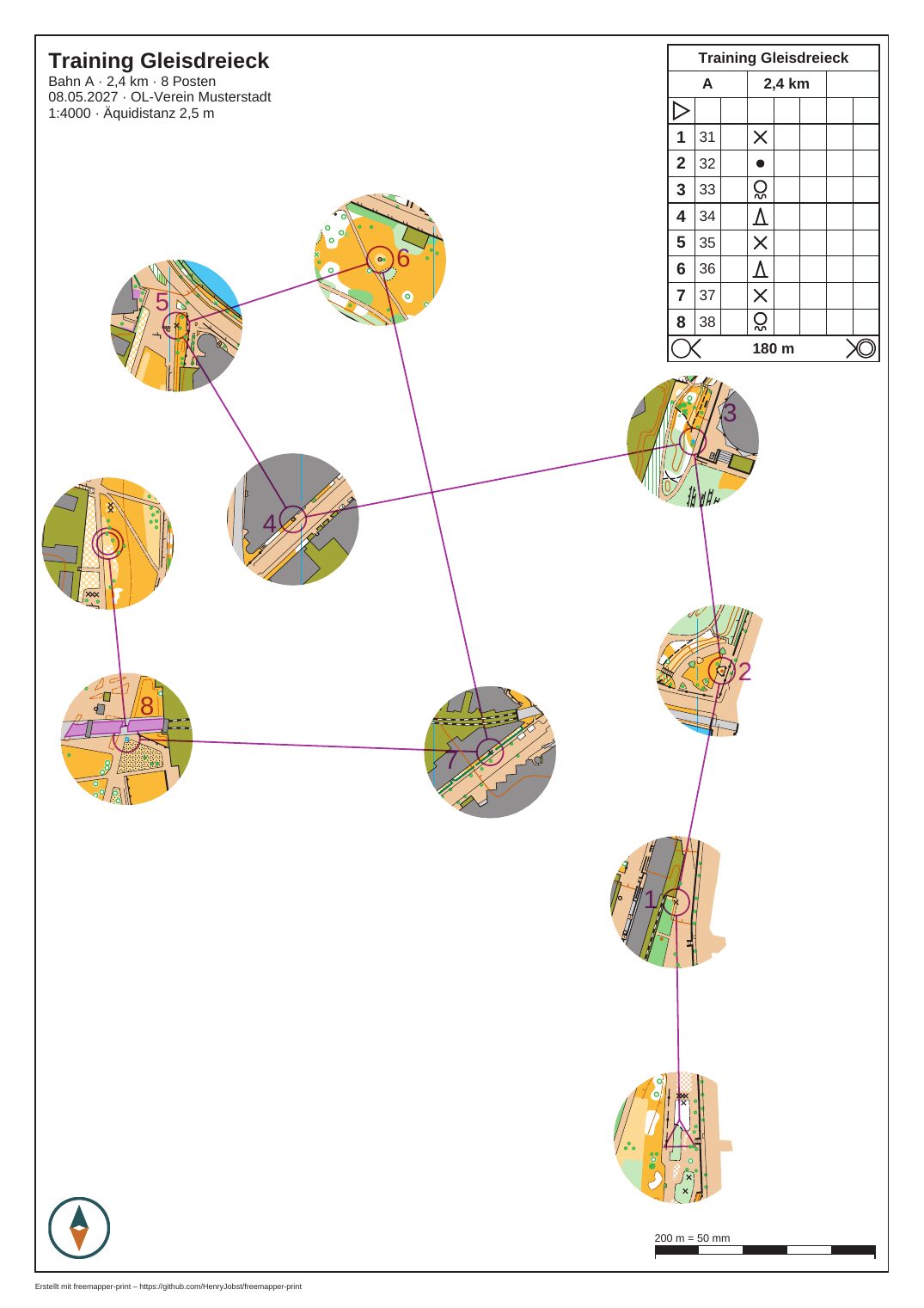
Course "A" with a mask for window orienteering (masks window --course A --assign, defaults otherwise): ten windows of 15 mm radius on paper around start, controls and finish. None touches another, and white paper lies between them. Map: Remo Madella, MOO Challenge Berlin 2025.
A corridor along a line: masks corridor
There is no automatic corridor. No rule book says where a corridor runs; the course setter decides that. You give the line, and the program turns it into the band.
freemapper-print masks corridor stadtsprint --points "-92,2.3;-60,4.4;-28,-2.5;-15.5,58.5" --width 12 --assign --course A
| Option | Meaning |
|---|---|
--points <X,Y;X,Y;…> | the line as points in map mm with the y axis up, as OOM's status bar shows them, decimals with a point. At least 2 different points, at most 1000. Required. |
--width <MM> | width of the corridor, 1 to 100 mm. Default: 10. |
--course <NAME> | the course whose layout gives the print scale for the width |
--assign | the course of --course prints with the corridor. Needs --course. |
--id <ID> | id of the new mask. Default: corridor-<n>, the first number not taken. |
Find the points in OOM: point at a spot on the street and read the two numbers in the status bar, as for centre_map_mm. Put a point at each crossing and at each bend, and make sure every control of the course lies in the corridor.
The width counts in millimetres on paper too: with --course at the print scale of that course's layout, otherwise at the print scale all layouts share. If the layouts print at different scales, the command asks for --course. As with the radius, the mask keeps the width in map mm. After changing the print scale, delete the mask and run the command again. The corridor runs half the width to each side of the line, and its ends are cut square. A turn of up to 120° keeps a pointed outer corner; a sharper one is cut off. The program refuses a corridor that turns back on itself, has a piece too short for the turn at its end, or crosses itself. Then simplify the line at the place the message names, or take a smaller width. The program does not repair the line itself.
The comment above the new table repeats the points as --points "…", so you can run the command again later. The command does not write a branch or a second corridor for the same course. For that, run it without --assign with an --id for each piece, then copy the second ring (the hole) of one piece into the polygon of the other. Holes may overlap. Delete the table you no longer need.
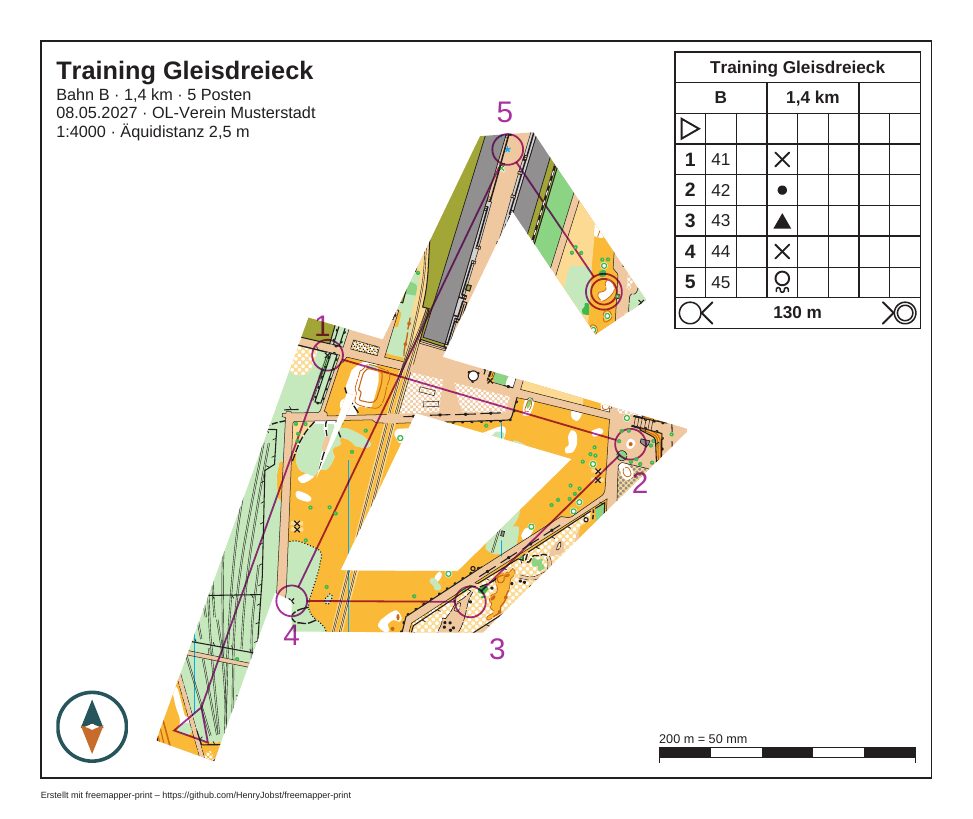
Course "B" with a corridor mask (masks corridor --width 12) on a sheet of 190 mm × 160 mm (page_mm). Legs 1 to 2 and 4 to 5 of the course cross, so the corridor was made in two pieces and merged, as described above. Map: Remo Madella, MOO Challenge Berlin 2025.
What both commands write
Both append the new [[masks]] table to the end of the project file as text, with a comment on how it was made. With --assign the course's assignment gets a line mask = "…" right below its [[assignments]] header, or a new assignment follows the table. Everything else stays as it is, comments and line endings included. The program then loads the file again and puts the old content back if that fails.
The commands never change a mask that exists. They refuse an id the file has already, and a course that prints with another mask, with exit code 2. For a new radius or a new line, delete the table and the line mask = "…" and run the command again. Then check shows the result.
White-out from Purple Pen
Purple Pen has white-out areas. The program prints them as masks with the ids whiteout-<n>, where n is the number Purple Pen gave the area (not always 1, 2 …), on the courses they belong to in Purple Pen. A course without mask in its assignment gets each of its white-out areas, each on its own, also where they overlap. check lists the white-out areas once, as information.
- When a course's assignment names a mask of its own, only that one applies, and the white-out areas drop out for that course.
mask = "whiteout-101"prints the course with the white-out area numbered 101 only.- A
[[masks]]table with the idwhiteout-101takes the place of the white-out area numbered 101. - If the course file no longer has the white-out area named,
checksays so, and the course prints without a mask. The assignment stays in the project file.
The number in whiteout-<n> is Purple Pen's own number for the area. It survives deleting another white-out area or changing their order. Only a course file without such numbers (one that did not come from Purple Pen 4) falls back to the place in the file, and then whiteout-2 can mean another area after a deletion. Check the assignments and the [[masks]] tables after such a change. check helps with one information line for each course whose assignment names a white-out area by its number, or on whose sheet a [[masks]] table takes the place of one. The line gives the middle of the area in map mm with y up, so you can find it in OOM.
A sheet applies at most 1000 masks. If a course has more white-out areas, the rest are left out, and check warns.
What check reports about masks
check tests each sheet against the masks it applies. The messages and their fixes are in chapter 10; here is when they come:
- A control, the start, the finish or a map exchange has its centre in a masked area (note). On a window course a window is usually missing; on a corridor course the control lies beside the corridor. Add the window, move the line, or check that the assignment names the right mask.
- Marked routes, crossing points, forbidden routes, out-of-bounds areas and their boundaries, dangerous areas or texts of the course file lie wholly or in part under the mask (note, per kind with its count). The runner would see them with no map under them. Widen a window or add one; if it is meant, leave the note. Plain legs and control numbers do not count.
- The mask hides the whole map frame (note). Most often y is written the wrong way round.
- A sheet element or the footer covers part of a window inside the map frame (note).
- The mask hides nothing in the map frame (information). White-out areas from Purple Pen that hide nothing come in one line per course.
- The check reached its limit, at most 200 000 points and 50 million steps per sheet (note). Look at the sheet.
- No course uses a mask (information, once per run).
Limits
What the program cannot do yet:
- It lays no corridor on its own and no windows around legs. Shapes other than circles and corridors you write by hand.
- The commands do not change or replace a mask. The editor (chapter 12) draws masks but does not replace one either; to change one, edit the file or use a new id.
- A layout sheet without a course (
export --layout) has no mask. - North lines the program adds without a 601 symbol in the symbol set lie on the sheet layer and stay visible across the masked paper (chapter 6, "North lines"). The map's own north lines are hidden with the map.
- The program does not check a white-out area from Purple Pen whose ring crosses itself. A loop that runs against the rest shows the map where Purple Pen hides it.
For masks you write by hand, the program checks on loading:
| Rule | Reason |
|---|---|
| A ring has at least 3 different points that do not lie on one line. | Otherwise it encloses no area. |
| A ring does not cross or touch itself. | For a ring that crosses itself it is not clear what lies inside. |
| A hole lies wholly inside the outline of its polygon and does not touch it. | A hole outside the outline uncovers nothing, and what was meant stays unclear. |
| The outlines of one mask do not overlap, touch or lie inside one another. | The map would show again where they overlap. For two areas that touch, draw one outline around both. |
| Every number is finite and lies between −2 000 000 and 2 000 000 mm. | That is the reach of an OOM map. |
| At most 64 masks per file, 256 polygons per mask, 4096 points per ring, 100 000 points in the whole file, 100 million steps for all checks together. | The limits protect against broken or hostile files. A window from masks window has about 50 points, the ten windows of gleisdreieck-training-window about 500 together. |
| The project file has at most 16 MB. | The masks of a file within the other limits take about 4 MB at most. A larger file would need gigabytes of memory to read before those limits could refuse it. |
A broken rule stops check and export. The message is in English and names file, line, column and the field, for example:
./freemapper-print.toml:74:9: field `masks[0].polygons[0][2]`: the hole must lie wholly inside the outline of its polygon (the first ring) and not touch it
polygons[0][2] is the third ring of the first polygon, that is the second hole.
Errors of the commands
These messages end masks window and masks corridor with exit code 2, and the project file stays unchanged:
- "the project file has a mask … already": choose another id with
--id. - "course … prints with the mask … already": change the assignment by hand; the program does not replace a mask.
- "the assignment of course … is not written as a table [[assignments]] of its own …": add
mask = "…"by hand. "the assignments are not written as tables [[assignments]] …" comes for a course without an assignment when the file writes its assignments asassignments = [...]: add the assignment withmask = "…"by hand. - "… mm is outside 1 to 100 mm …": radius, width and gap are print mm.
- "… are … mm apart on paper, too close for two windows …": leave one of the two controls out, or give a smaller
--gap, at most the value the message names. - "--controls takes control codes separated by commas …" and "course … has the control numbers 1 to …": check the selection.
- "control … gets no window, so --radius-for cannot set its radius": add the control to
--controls, or leave--radius-forout for it. - "--points takes points as x,y;x,y;… in map mm …": separate the points with semicolons and x and y with a comma, decimals with a point.
- "the corridor turns too sharply at … for its width …" and "the corridor crosses itself near …": simplify the line there or reduce the width.
- "the layouts print at different scales …": give
--course.
A command ends with exit code 1 when the project, the map or the course file cannot be loaded, the file cannot be written, or the changed file does not load. In the last case the program puts the old content back.